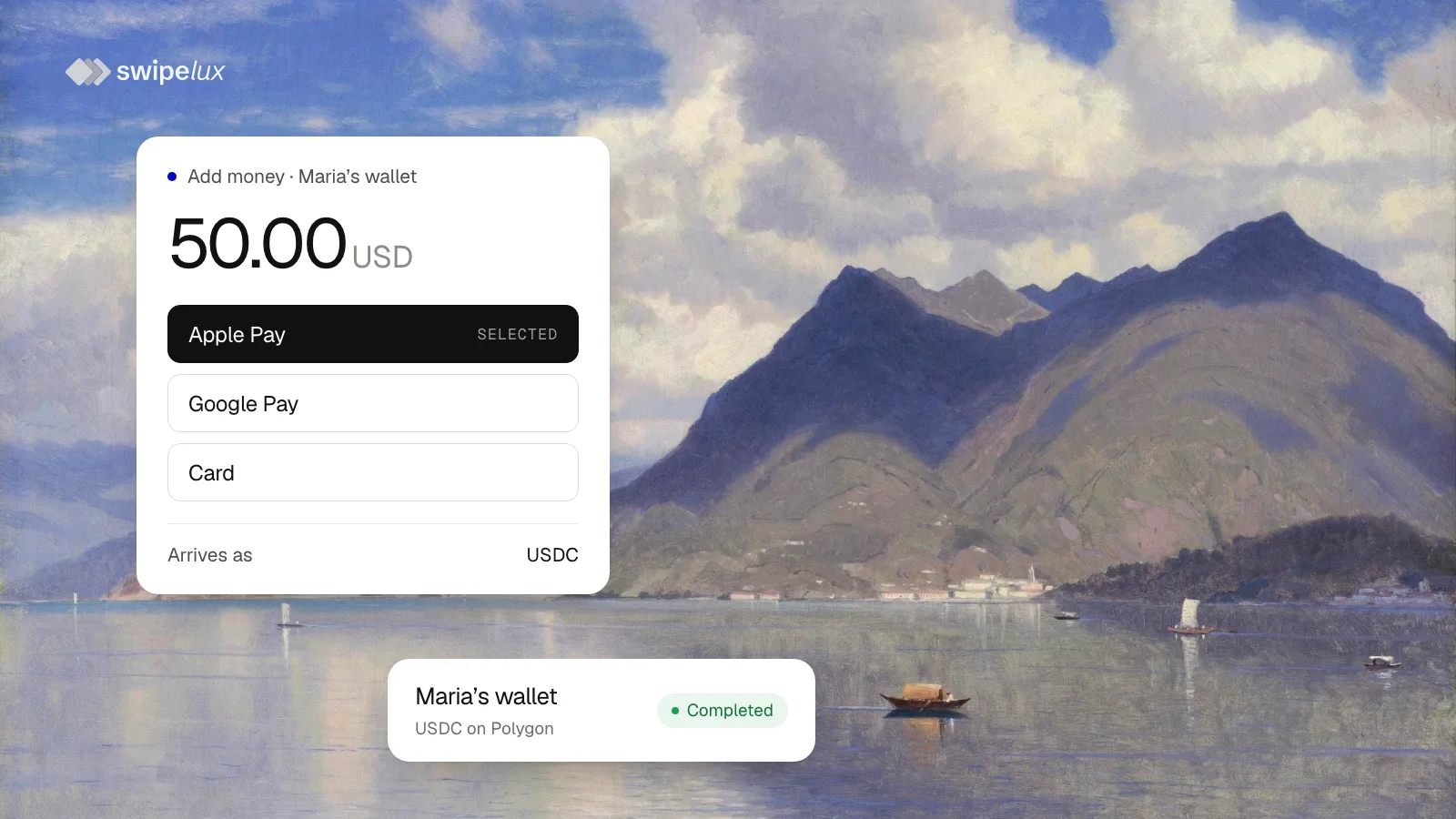
To let customers buy crypto with a credit or debit card inside your app, you need a fiat-to-crypto on-ramp: the customer pays in dollars or euros and receives a digital asset in a wallet. Swipelux gives your app one through an API. Customers pay by credit or debit card, Apple Pay or Google Pay on a hosted checkout, and USDC lands in their wallet on your platform. The integration is three requests. You sign no contract with a card processor, and card details never touch your servers.
Integrate card payments in three requests
Before the first payment, create the customer and their wallet, and request the card capability for them. Card payments are for individual customers.
1. Create a quote
Send the amount in USD or EUR, USDC as the asset to deliver, and the customer's wallet:
POST /v3/quotes
{
  "customerId": "cus_...",
  "capabilityId": "card",
  "in": { "amount": "50.00", "currency": "USD" },
  "destinationId": "acc_...",
  "out": { "currency": "USDC" }
}
The quote returns the fees and the USDC the wallet receives. Show those numbers to the customer. A quote lasts five minutes.
2. Create the transfer
POST /v3/transfers
{
  "quoteId": "quo_...",
  "checkoutMethod": "apple_pay",
  "redirectUrl": "https://your-app.example/payments/complete"
}
checkoutMethod and redirectUrl are optional. The first picks the method the checkout opens on, and the second brings the customer back to your app.
3. Open the checkout
Read the transfer's instructions. They hold a link to the hosted checkout:
GET /v3/transfers/{transferId}/instructions
{
  "data": {
    "transferId": "tr_...",
    "instructions": {
      "type": "redirect",
      "amount": { "amount": "50.00", "currency": "USD" },
      "url": "https://..."
    }
  }
}
Open the link for the customer. They pay by credit or debit card, Apple Pay or Google Pay, and USDC arrives in the wallet. The transfer becomes completed, and a webhook tells your app.
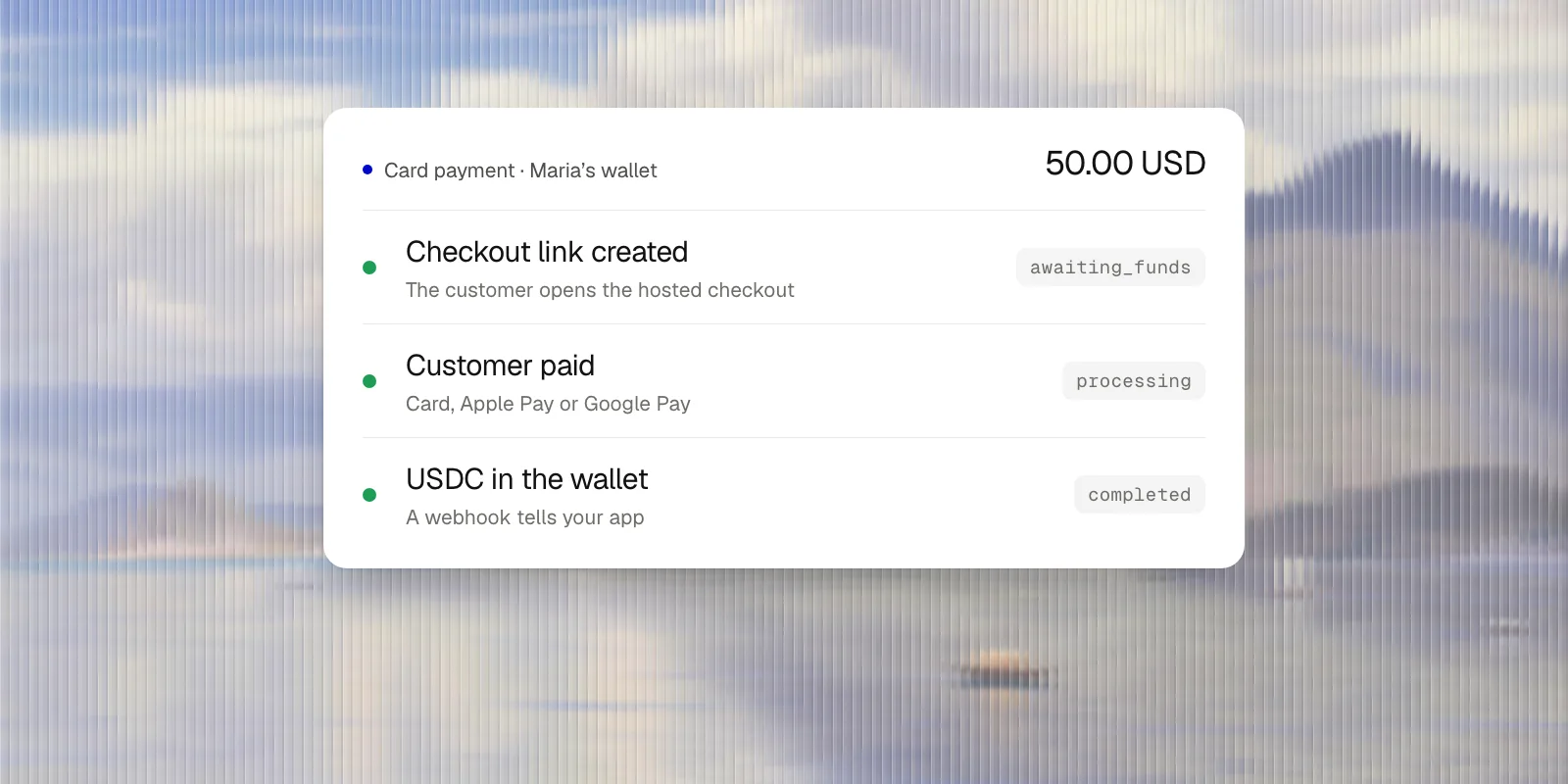
These are the steps of a bank pay-in. Only the instructions differ: a checkout link where a bank pay-in has account details. The Receive funds guide has every field.
Add Apple Pay and Google Pay for crypto purchases
Your customers buy with the wallet already on their phone. Apple Pay and Google Pay are part of the same checkout, not separate integrations. Send checkoutMethod as apple_pay, google_pay or card, and the checkout opens on that method when the customer's device supports it. The customer can still pick another.
Swipelux hosts the checkout, so there is no Apple Pay or Google Pay merchant setup on your side and no domain to verify. Arriving at redirectUrl does not prove the payment: read the transfer's state.
What apps use it for
- Crypto wallet apps: customers top up their balance from their phone.
- Neobanks and fintech apps: a new customer funds the account without waiting for a bank transfer.
- Any app that sells crypto: customers buy USDC with a credit or debit card without leaving your product.
On-ramp and off-ramp in one API
The on-ramp is half of the trip. The same API runs the off-ramp: USDC leaves the wallet and arrives in a bank account by ACH, wire, Pix, SPEI and other payout methods. One customer, one wallet and one integration cover both directions.
Fees and settlement
Each quote itemises the fee, a processing fee and a network fee, and shows the USDC the wallet receives, before the customer pays. The checkout confirms the final amount. The wallet holds USDC on Polygon, Ethereum or Base.
Test the integration in Sandbox
Sandbox runs the same quote and transfer with no real card. Mark the transfer completed or failed with one request, and watch your app handle both. Not writing code yet? The dashboard's First pay-in walkthrough takes a customer through a card or Apple Pay payment.
Questions people ask
How do I integrate card payments for crypto purchases into my app?
Create the customer and their wallet and request the card capability. Then each payment is three requests: a quote, a transfer and the transfer's instructions, which hold the checkout link your app opens.
What is a crypto on-ramp?
A service that converts fiat money, such as dollars or euros, into crypto and delivers it to a wallet. Fiat on-ramp, fiat-to-crypto on-ramp and fiat-to-crypto payment gateway are other names for it. An off-ramp does the reverse: crypto out, money into a bank account.
Is there a fiat-to-crypto widget or SDK to install?
No. The checkout is a hosted page behind a link, so there is nothing to embed and no SDK to keep up to date. Your web or mobile app opens the link, and redirectUrl brings the customer back.
Can customers buy crypto with Apple Pay?
Yes. When the customer's device has Apple Pay, the checkout offers it, and checkoutMethod: "apple_pay" opens the checkout on it. The customer receives USDC in their wallet.
Can customers buy crypto with Google Pay?
Yes, the same way: the checkout offers Google Pay on devices that have it, and checkoutMethod: "google_pay" opens on it.
Do I need my own card processor?
No. Swipelux provides the checkout and the card processing. You integrate one API.
Can customers buy crypto with a credit card?
Yes. Visa and Mastercard credit cards work on the checkout, typed into the page or held in Apple Pay or Google Pay. The customer receives USDC in their wallet.
Can customers buy crypto with a debit card?
Yes. Visa and Mastercard debit cards work the same way as credit cards.
Which currencies and which crypto?
The customer pays in USD or EUR and receives USDC on Polygon, Ethereum or Base.
Do customers need KYC before paying by card?
You collect no documents before a card payment. When a check is needed, the checkout runs it.
What does a card payment cost?
The fee is in the quote for each payment, itemised, next to the USDC the wallet receives. Your customer sees the final amount on the checkout before paying.
How do I know a payment went through?
The transfer moves from awaiting_funds to processing to completed, and each change sends a transfer.state_changed webhook. A declined payment ends as failed, and a link nobody paid ends as canceled.
Can business customers pay by card?
Card payments are for individual customers. Businesses pay in by bank transfer: ACH, wire, Pix, SPEI and more.
Where is the on-ramp available?
The country list for card payments is in the Jurisdiction Framework.
Can my AI agent create a card payment?
Yes. Connected through the Swipelux MCP server, Claude or ChatGPT creates the quote and the transfer and hands you the checkout link.
Start now
- Sign up for Swipelux; Sandbox is ready right away.
- Create a customer and a wallet, and request the card capability.
- Create a quote and a transfer, then open the checkout link.